In Google Ads, a bidding cap (often called a Max CPC cap) is the maximum amount you allow Google’s automated bidding strategies to spend per click. It acts as a safeguard so that even when using Smart Bidding (like Target CPA or Target ROAS), your bids never exceed the limit you set.
Detailed Explanation
1. What is a Bid Cap?
- A bid cap is a ceiling on how much Google Ads can bid in auctions.
- It’s most commonly applied in Smart Bidding strategies (Target CPA, Target ROAS).
- Ensures that automated bidding doesn’t overspend on clicks, especially in competitive auctions.
2. Why Use a Bid Cap?
- Budget control: Prevents runaway costs in highly competitive keyword auctions.
- Risk management: Protects campaigns from paying excessively for low-value clicks.
- Consistency: Keeps CPCs aligned with your profitability thresholds.
3. How It Works
Example: If you set a Max CPC cap of ₹50, Google Ads will never bid more than ₹50 for a click, even if the algorithm thinks a higher bid could improve conversions.
This cap is applied through Portfolio Bid Strategies in Google Ads settings.
4. Key Strategies Involving Bid Caps
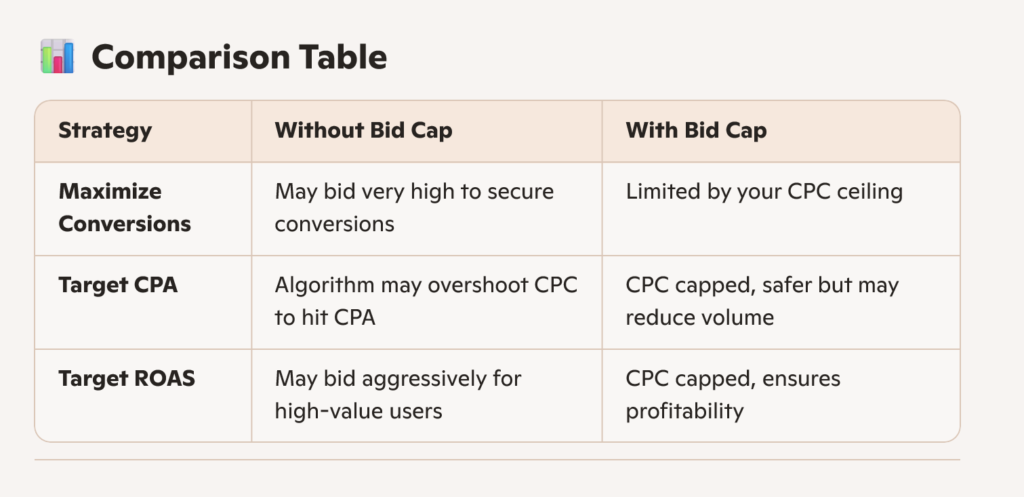
Max CPC Cap: Limits the maximum cost-per-click in automated bidding.
Target CPA (Cost Per Acquisition): You can add a bid cap to prevent CPCs from exceeding a set threshold.
Target ROAS (Return on Ad Spend): Similarly, a cap ensures bids don’t go beyond your profitability margin.
📊 Comparison Table
⚠️ Risks & Trade-offs
Pros: Protects budget, avoids overspending, ensures profitability.
Cons: May limit reach if your cap is too low, causing fewer impressions or missed conversions.
Best Practice: Set a cap slightly above your average CPC to allow flexibility while maintaining control.
✅ Actionable Tip
If you’re running campaigns in India (like in Bachupally, Hyderabad), start by checking your average CPCs for your industry keywords. Set your bid cap ~10–20% above the average CPC to balance cost control with competitive visibility.
🛠 Step-by-Step: Setting a Bid Cap in Google Ads
1. Log in
- Go to your Google Ads account dashboard.
2. Navigate to Bid Strategies
- On the left-hand menu, click Tools & Settings (the wrench icon).
- Under Shared Library, select Bid strategies.
3. Create or Edit a Portfolio Bid Strategy
- Click the + button to create a new strategy, or select an existing one to edit.
- Choose a Smart Bidding strategy (e.g., Target CPA or Target ROAS).
4. Set the Bid Cap
- Scroll down to the Advanced Options section.
- Look for Max CPC bid limit (sometimes called bid cap).
- Enter the maximum amount you’re willing to pay per click (e.g., ₹50).
5. Apply the Strategy
- Assign this portfolio strategy to the campaigns or ad groups you want to control.
6. Monitor Performance
- Keep an eye on your average CPC and conversion volume.
- If your cap is too low, you may miss out on impressions or conversions. Adjust gradually.
📊 Example
Suppose your average CPC is ₹35.
You set a bid cap of ₹50.
Google Ads will optimize bids but never exceed ₹50 per click, even if competition spikes.
⚠️ Pro Tips
- Don’t set the cap too low → It may restrict your ads from showing in competitive auctions.
- Start slightly above your average CPC → Gives Google’s algorithm room to optimize.
- Review weekly → Adjust based on performance and budget.